Do you ever go back and read journal entries you wrote years ago? I do, and I love it. I’ve forgotten so much of my life! I was so funny/lucky/stupid! Time is fleeting, and we’re all hurtling toward death!
But seriously, keeping a journal is a good thing. It’s a tool for self reflection. It defrags the brain. It helps you sort through the clutter of daily life and hone in on what’s important. I just wish I did more of it.
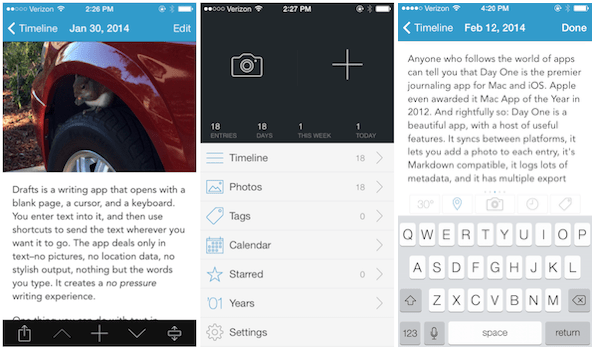
Anyone who follows the world of apps can tell you that Day One is the premier journaling app for Mac and iOS. Apple even awarded it Mac App of the Year in 2012. And rightfully so: Day One is a beautiful app, with a host of useful features. It syncs between platforms, it lets you add a photo to each entry, it’s Markdown compatible, it logs lots of metadata, and it has multiple export options. It even makes your entries look like beautiful, minimalist web articles. What more do you want in a journaling app?
As great as it is, Day One never clicked with me. All of those features are amazing, but they have weight. Each Monday, when the app chimed to tell me it was time to write in my journal, I didn’t feel like writing–I felt anxious.
The problem was all those amazing features. I wanted to write something that was worthy of them. I wanted the photo to look just right, and capture the tenor of the entry. I wanted the writing to be as witty as Twain and as polished as a New Yorker article. And who has the time for that?
I take full responsibility for this reaction, by the way. This says much more about me than it does about Day One and its makers.
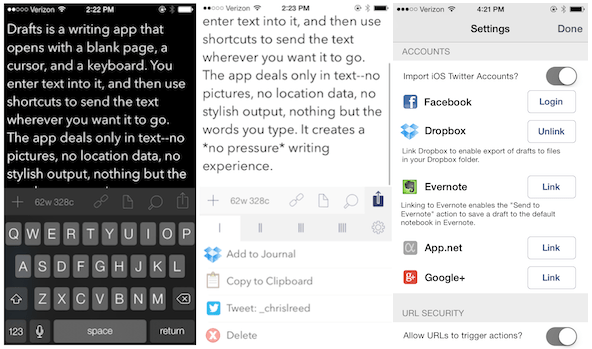
I finally solved my journal anxiety by using another app: Drafts. Drafts is a writing app that opens with a blank page, a cursor, and a keyboard. You enter text into it, and then use shortcuts to send the text wherever you want it to go. The app doesn’t do pictures, location data, or modern minimalist output–it deals strictly in words. It creates a no pressure writing experience.
No pressure. For me, that’s a key feature for a journaling app.
Drafts wasn’t designed for journaling, but here’s how I use it. With the push of a button, I send the text I’ve written in Drafts to my journal’s .txt file in Dropbox. It even automatically adds the date. Boom: instant journaling app. Easy peasy.
I write in my journal all the time now. Sometimes I treat it like a personal Twitter feed, jotting down a thought here and there and sending it to my journal. Other times I type out long entries that I edit carefully before adding. Either way, there’s no friction and no pressure. It feels good.
If you haven’t tried Day One, it’s definitely worth a shot. The results are amazing, if you can handle it. But if you struggle to find the bandwidth to write in your journal regularly, Drafts just might do the trick.


 chrislreed
Leave a reply to Jipper Cancel reply